
PDF Versus Printed Plans: Which Should You Use?
If you are applying online, you will probably want a PDF. If you are sitting round a table discussing the site, a printed plan may be easier to use. Choosing PDF versus printed plans is usually about what happens next, rather than one format being better in every situation. You can have both, provided the information stays clear and the printed scale is right.
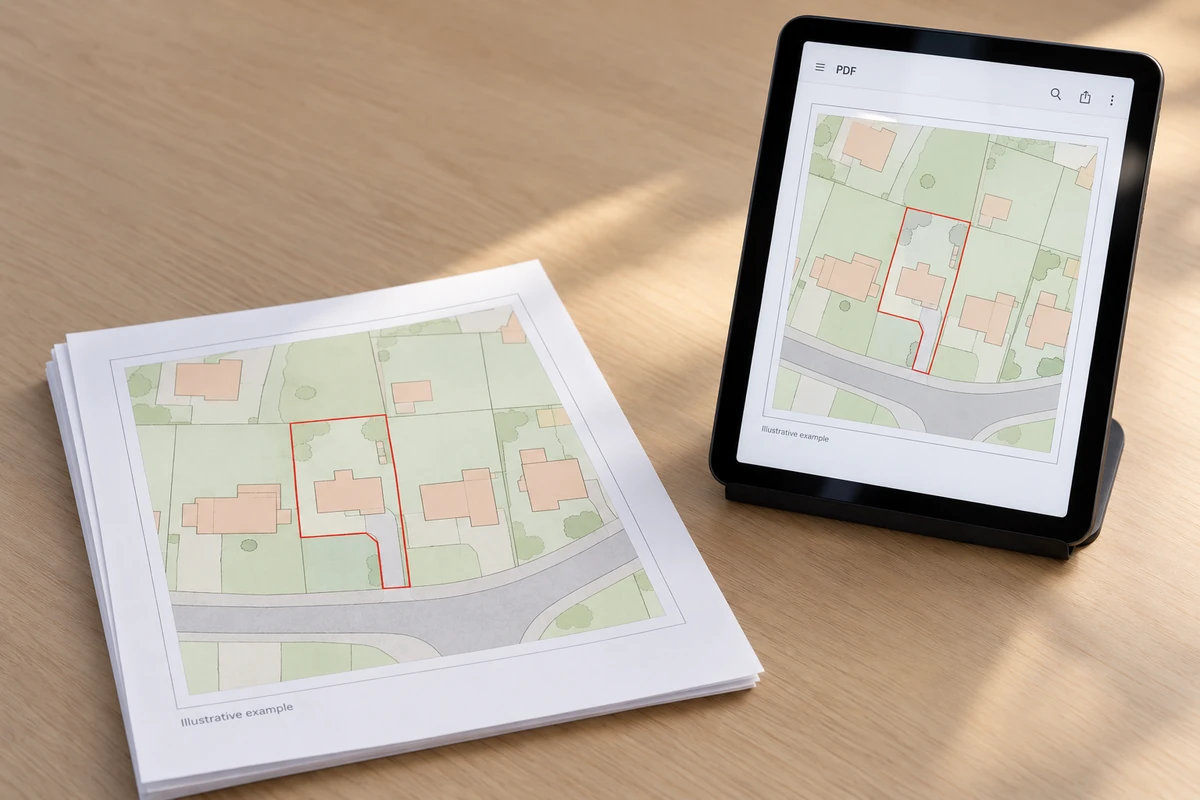
There are a few details worth sorting out before you order: the council's submission requirements, the paper size, how many copies you need and who will use them. Here is how to make that choice without buying or printing more than you need.
PDF versus printed plans for planning applications
Start with the authority receiving your application. Check which files its submission service accepts and, if applying on paper, the required sheet sizes and number of sets. Requirements differ between UK nations and authorities.
In England, government guidance encourages electronic applications and says they do not need additional paper copies of the application or accompanying information. A paper application is a separate route; check the council's instructions rather than assuming an online upload also needs a posted set.
The format does not change what the map must show. You still need the appropriate scale, north indication, relevant surroundings and clear application boundaries. A PDF and a paper copy of the wrong site are both wrong.
Our location plans provide the wider view, commonly at 1:1250 or 1:2500. Site or block plans show the closer detail, commonly at 1:200 or 1:500. Choose the plan type first, then decide how you want to receive and use it. Proposed work and other application drawings may still need adding.
Why PDFs are usually the first choice
A PDF is convenient when the next step is uploading a plan or sending it to your architect. You can save the original file, check it on screen and keep it with the rest of the application. There is no need to print it and scan it back in simply to send the same information electronically.
UK Planning Maps provides an immediate download after ordering. The email copy can take up to 20 minutes, so use the download rather than waiting for your inbox if you need the file straight away. Our help page explains the delivery and format options.
Save the purchased map separately from your working drawing and final submission. They may become different documents once a designer adds the proposal. A file name with the site, drawing type and revision is much easier to follow than several versions called “final”.
Clarity is more important than file size
Keep the original PDF wherever possible. Taking a screenshot, pasting it into another document and exporting again can blur the map or alter its page size. Scanning a paper copy adds another opportunity for distortion.
Check road names, thin lines, boundaries and small labels in the file you will actually upload. File size still matters: follow the portal's current upload limits, but do not compress the drawing so heavily that essential detail disappears. If a file is too large, ask the drawing's creator for a suitable export.
Scale needs careful handling
The scale label belongs with a particular sheet size. A plan prepared at 1:500 on A3 will not remain 1:500 if you shrink the whole page to fit A4. Likewise, the PDF viewer's screen zoom does not prove the physical scale. Do not measure against your monitor with a ruler.
For printing, select the stated paper size and use “Actual size” or 100%. Adobe's printing guidance distinguishes this from “Fit”, which resizes the page. Actual size can still crop a sheet that the printer cannot accommodate, so check both the settings and the result.
A simple scale-bar test helps. On a 1:500 print, a bar interval representing 20 metres should measure 40 mm on the paper. If it does not, investigate the page size and printer settings before relying on the drawing. This checks reproduction size, not the accuracy of the surveyed features.
Our sister website has a step-by-step guide to printing a planning map to scale, including what to do if the edges are clipped. Our supplied PDFs are not georeferenced; that is separate from whether they print correctly to scale.
When printed plans remain useful
A paper plan can make a discussion much easier. Everyone can see the same sheet, point to the access and compare the proposal with neighbouring buildings. It is useful when a small screen makes detail awkward to follow, or when you would rather take paper than a device to a site visit.
Keep discussion notes separate from the issued application drawing. If someone sketches a possible change during a meeting, label that copy as a working note. It should not quietly replace the drawing everyone else is using. A planning map is also not a construction or setting-out drawing simply because a builder has a printed copy.
You can add four printed copies to PDF, Word or JPG orders. The current printing option starts from £6; check the total for your chosen map before paying. Allow time for dispatch and postage, and ask us about timing if you have a deadline. Dispatch is not the same as delivery to your door.
Check the copying allowance too. Our published help states that you may print one copy of each ordered plan unless you hold the relevant Ordnance Survey Paper Maps Copying Licence. It directs customers needing more to the four-copy option. A saved PDF does not mean unlimited reprinting; check the terms applying to your order or ask us before making additional copies.
Common problems with home printing
The first problem is automatic resizing. A printer may shrink the page to avoid its unprintable margins, even when that looks harmless in the preview. Check the PDF reader and printer-driver settings, and avoid automatic borderless enlargement as well as “Fit to page”.
The second is missing information around the edges. Look for the north arrow, scale bar, page border and supplied copyright or licence details. If the printer cannot reproduce the complete sheet at the intended size, use suitable printing equipment rather than reducing the map until everything fits.
Colour needs checking where red and blue boundaries are used. A monochrome print may leave the outlines looking alike. Make sure the required boundary colours remain distinguishable and that neither faint ink nor a heavy line hides important map detail.
Also check what you are printing. A thumbnail in an email is not the original attachment. A photograph of a marked-up plan may have perspective distortion. Open the actual document and inspect the finished sheet, not just the preview.
If you need to change a boundary, ask about correcting the source file so the digital and paper versions agree. Keep informal pen marks clearly separate from the version being submitted.
A practical approach for most applicants
For an online application, start with the correct PDF plan and review the preview before ordering. Check the site, coverage and any boundaries you have added. Use Advanced Search if the postcode does not identify the land clearly.
Then decide whether paper has a purpose: a meeting, site visit or paper submission. Order the copies you need, or print within your licence allowance, keeping the original file safe.
Before sending or handing over a plan, check:
- The correct site, drawing title and revision.
- The stated scale and intended sheet size.
- Readable boundaries, labels and surrounding detail.
- Visible north indication, scale bar and licence information.
- Agreement between the PDF and any paper copies.
Need help choosing? R J Kay praised the telephone help in a published site-plan review. Call 01856 898 022 with your council's request or designer's brief to hand.
PDF versus printed plans need not be an either-or decision. Keep a clear digital record, use paper where it helps, and make sure both show the version you intend people to rely on.
Ready to Get Your OS Plans?
Every plan is instantly downloadable, Planning Portal‑compliant, and includes all required elements. Get your plan now and submit your application with confidence.