
How to Annotate a Planning Block Plan Correctly
You know where the extension will go, which driveway you use and what is staying as it is. The person checking your planning application does not. When you annotate a planning block plan, your job is to make those details clear without covering the map in notes. A few well-placed labels can explain far more than a crowded drawing.
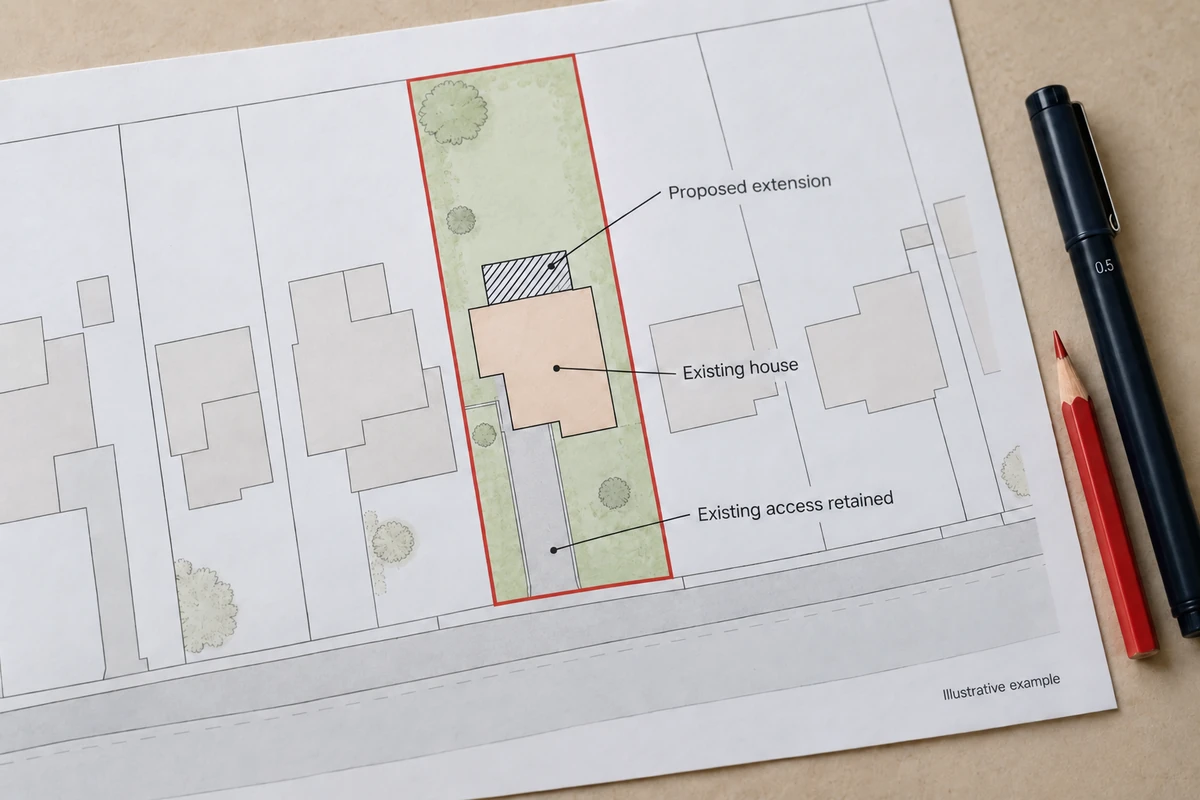
Start with a suitable base plan, then work through the changes one at a time. This guide explains what to label, how to separate existing and proposed work, and what to check before sending the finished file to the council.
What a planning block plan needs to show
A block plan, also called a site plan, shows the property and its immediate surroundings. It helps the council understand where the proposal sits in relation to nearby buildings, boundaries, access and other relevant features.
Our site and block plans are available at 1:200 and 1:500. The first gives a closer view; the second covers more ground on the same sheet. Choose the scale and coverage your application needs, checking your council's requirements before ordering.
A block plan is different from a location plan, which identifies the site in the wider area. You may need both, alongside floor plans and elevations. Adding labels to a base map does not replace drawings showing the design itself.
Before you start, find your council's planning map guidance through our sister website, Planning Maps UK. Follow through to the authority's current requirements for your application type. National rules differ across the UK, and the useful details for a house extension will not necessarily be the same as those for a larger development.
How to annotate a planning block plan clearly
Keep an untouched copy of your download. Make changes on a separate working copy so you can return to the original if a label moves or the page layout changes.
First, check the site extent. For applications in England, the government's location-plan guidance says the red outline should include all land needed for the development, including necessary access. Other nearby or adjoining land owned by the applicant is outlined in blue. Keep the site extent consistent wherever you show it across the drawing set.
The red line is an application boundary, not proof of ownership. Do not automatically trace the building footprint or assume every boundary must follow a fence. If the proposal needs land outside your ownership, ask your planning adviser about the extent, certificates and notices before submitting.
Next, identify the proposed work. A label such as “Proposed single-storey rear extension” tells the reader much more than “Extension”. Use a clear outline or hatch, explained in a small key, so the new work can be picked out from the existing building.
Useful labels might include:
- “Existing house retained”, pointing to the existing building.
- “Proposed single-storey rear extension”, pointing to the new footprint.
- “Existing garage to be demolished”, where removal forms part of the scheme.
- “Existing vehicle access retained”, where the entrance is not changing.
- “Proposed parking area”, with relevant dimensions shown separately.
These are examples to adapt, not a list to copy regardless of the proposal. Only describe something as retained, removed or proposed when that is what your application actually shows.
Place text in a clear part of the sheet and use a short leader line to the feature. Check where the line ends: a note pointing between a patio and an extension leaves the reader guessing. Avoid putting labels over the red boundary, neighbouring buildings or road names.
If space is tight, use numbered references and a short key. Keep specialist information on separate drawings where needed, with matching references. Do not squeeze a drainage design into the corner simply because there is some white space left.
Existing and proposed information must be easy to separate
A new outline is not much help if the council cannot tell whether it represents an existing wall or proposed work. Use a consistent drawing convention, explain it in the key and give the sheet a clear title, such as “Proposed Block Plan”.
Hatching, line styles and direct labels help readers distinguish features when colour is less clear. They should supplement, not replace, the required red and blue boundary colours.
For an extension, also check the space around it. Is a patio being replaced? Will the path still reach the back garden? Are the parking spaces staying? Show relevant changes and retain enough surrounding detail to make them understandable. Separate existing and proposed sheets can be clearer when there is too much to show on one drawing.
Add dimensions where they answer a planning question
Think about what someone needs to check. The distance from an extension to a side boundary may matter. So might the width of an access, the size of proposed parking spaces or the separation between buildings.
Use measured information or your designer's verified drawings for these dimensions. Do not estimate a clearance by eye from a small map. Ordnance Survey explains that its mapping shows physical features rather than definitive legal ownership boundaries. A mapped fence does not settle a boundary dispute, and a base map is not a substitute for a measured survey where accurate site dimensions are needed.
Make units explicit and show precisely what each dimension measures. A line from the proposed wall to the boundary is clearer than a number floating somewhere in the garden. Keep the same dimensions on the block plan, floor plans and other drawings.
You do not need every construction measurement here. Put detailed design information on the appropriate drawing, then cross-reference it where useful. Avoid quoting a standard parking or access dimension without checking the requirements that apply to the site.
Common block plan annotation mistakes
Resizing the map to make room for notes is easily done, particularly in a document editor. It can leave the printed scale wrong even though the original scale label is still visible. Preserve the map's dimensions and page size; move the notes or choose a suitable larger sheet instead.
Do not crop away the north arrow, scale bar, surrounding context or supplied copyright and licence information. Keep the map's orientation and north indication together. Our PDFs are not georeferenced, so they should not be treated as coordinate-referenced CAD files.
Another problem is leaving out apparently obvious information. If a garage is disappearing but its parking spaces are being replaced elsewhere, show both changes. If access is unchanged, a brief note can remove uncertainty.
Be careful with trees and other constraints. Showing a tree symbol does not establish its surveyed position, canopy spread, root protection area or protected status. Where specialist evidence is required, refer to the relevant survey or report rather than improvising the detail.
Finally, look for contradictions after every revision. A moved extension may affect the patio, drainage or distance to the fence. Update the related annotations as well as the outline, and give the revised drawing a clear date and revision reference.
Create a compliant plan without slowing down your application
Start by finding the property, choosing your block-plan scale and checking the coverage. Use Advanced Search if a postcode is not enough to locate the land. Our Ordnance Survey MasterMap-based plans provide the mapping base; the proposed development still needs to be added accurately.
Our help page explains the red and blue boundary tools and confirms that Word format is available for annotating your plan. If you use Word, keep the map at its supplied size when adding labels. For more involved design work, agree the file format with your architect first.
Need a hand with the drawing tools? An anonymous customer on our site-plan reviews described Rachel resolving a red-line problem within an hour. That was their experience, rather than a promised turnaround. Call 01856 898 022 if you need help with your order.
Before uploading, open the actual finished PDF and check:
- The correct site, drawing title, date and revision.
- The stated scale, sheet size, north arrow and scale bar.
- Clear labels, visible boundaries and retained licence information.
- Agreement with the other application drawings.
If printing, use the intended paper size and 100%, not “fit to page”. Check the council's upload requirements too. Clear annotations help explain an application; they do not guarantee planning permission.
Ready to Get Your OS Plans?
Every plan is instantly downloadable, Planning Portal‑compliant, and includes all required elements. Get your plan now and submit your application with confidence.